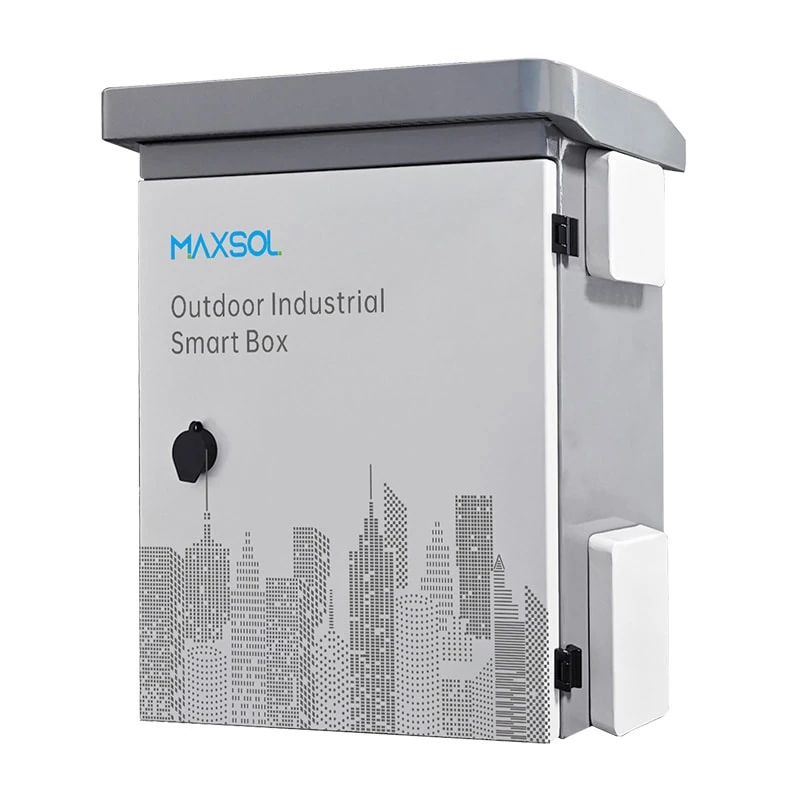
IP65 and IK10 Outdoor CCTV Enclosures: Selection Guide
Understand IP65 and IK10 ratings, then choose an outdoor CCTV enclosure by size, material, mounting, cable entry, cooling and servicing needs.
By Maxsol Team

An IP65 IK10 outdoor CCTV enclosure answers two separate protection needs: IP65 concerns resistance to dust and water jets, while IK10 concerns resistance to mechanical impact. Neither rating alone confirms that an enclosure will fit your equipment, manage heat properly, or remain sealed after cables, glands and mounting hardware are installed.
For Malaysian outdoor surveillance projects, select the enclosure around the complete installation—not only the camera. Account for the PoE switch, power supply, fibre or network termination, surge protection, cable bend radius, mounting position, rain exposure, heat, and future maintenance access.
IP and IK ratings answer different questions
An IP rating and an IK rating should be read together, but they do not measure the same thing.
IP65 is an ingress-protection rating:
- The first digit, 6, indicates dust-tight protection.
- The second digit, 5, indicates protection against water jets from any direction.
For a CCTV cabinet or junction enclosure, IP65 is relevant where wind-driven rain, wash-down exposure, airborne dust and insects could enter through gaps. However, the enclosure achieves its rating as a complete assembly. A poorly fitted gland, damaged door gasket, unsealed knockout or incorrectly installed ventilation part can reduce real-world ingress protection.
IK10 is a mechanical impact-resistance classification. It indicates a high level of resistance to external impact under the relevant test standard. This matters at accessible locations where an enclosure could be struck accidentally, knocked by maintenance activity or deliberately vandalised.
Why IP65 does not automatically mean IK10
An IP65 enclosure may keep dust and water out while having a lower impact rating. Conversely, an IK10 enclosure may be highly resistant to impact but require proper cable entries and door sealing to maintain its stated ingress protection.
When specifying an IP65 IK10 outdoor CCTV enclosure, verify both ratings on the actual enclosure model. Also assess the installed accessories, because cable glands, locks, hinges, windows, fans and mounting brackets can affect the finished installation.
What these ratings do not tell you
IP and IK labels are important, but they do not confirm:
- Internal usable space or equipment layout
- Suitable operating temperature for your PoE switch, power supply or battery
- Resistance to every chemical, salt-laden environment or ultraviolet exposure
- Protection against immersion or flooding
- Resistance to drilling, forced opening or unauthorised access
- Correct grounding, surge protection or cable management
- Whether the installed cabinet will meet the same rating after modification
Treat the ratings as one part of a wider site and design review.
Measure the equipment and cable space
Start with the full bill of materials that will sit inside the enclosure. A cabinet sized only for today’s PoE switch can become difficult to service when a fibre tray, surge protector, power supply or additional camera connection is added later.
Record the external dimensions of every component, then plan the internal arrangement before ordering.
Allow working space, not just component space
Leave enough clearance for the following:
- Door opening and access to terminals
- Ethernet plugs and cable bend radius
- Fibre patch cords, splicing trays and service loops where applicable
- AC and DC cable separation
- Air movement around heat-producing devices
- DIN rails, backplates, cable ducts and mounting brackets
- Future replacement of a switch or power supply without dismantling the full cabinet
- Safe access to protective devices and disconnects
Avoid packing equipment tightly against the door or enclosure walls. Even where the components physically fit, restricted cable routing can strain connectors, prevent the door from closing properly or make fault-finding unnecessarily slow.
Compare the stated enclosure dimensions
The published dimensions describe the enclosure size, but usable internal space may be reduced by door structure, seals, mounting hardware, backplates, rails and cable-routing requirements. Confirm the internal layout drawing where this affects the design.
| Enclosure option | Stated size | Material | Protection context | Typical planning consideration |
|---|---|---|---|---|
| IB542 | 500 × 400 × 200 mm | 1.2 mm galvanised steel with powder coating | IP65 and IK10 | Compact steel option where 200 mm depth suits the equipment arrangement |
| IB552 | 550 × 450 × 280 mm | 1.2 mm galvanised steel with powder coating | IP65 and IK10 | More depth for cable routing and larger internal assemblies |
| IP652 | 600 × 500 × 220 mm | 4 mm ABS housing | IP65 and IK09 | Larger ABS housing with a different impact classification and depth profile |
A 200 mm deep enclosure may be adequate for a compact switch and terminated cables, but it can become restrictive if large power supplies, surge devices, batteries or bulky cable loops are required. Depth is frequently the limiting measurement, particularly for equipment with connectors facing outward from a DIN rail.
For instance, the IB542 IP65 IK10 steel outdoor enclosure measures 500 × 400 × 200 mm. It may be considered where the planned component depth, cabling and working clearance suit a compact steel enclosure.
Where more internal depth is beneficial, the IB552 IP65 IK10 steel outdoor enclosure measures 550 × 450 × 280 mm. The additional depth should be assessed against the installed equipment layout rather than assumed to solve all thermal or cable-management issues.
Compare steel and ABS enclosure options
Steel and ABS are both used for outdoor electrical and networking enclosures, but they suit different design priorities. The better material depends on the site, equipment load, mounting method, impact exposure and earthing arrangement.
Galvanised steel with powder coating
A galvanised steel enclosure with powder coating is often selected where a rigid housing and higher impact classification are required. Both IB542 and IB552 are documented as 1.2 mm galvanised steel enclosures with powder coating, IP65 protection and IK10 impact resistance.
Potential considerations for steel include:
- A robust enclosure body for accessible or higher-impact locations
- The need to assess cut edges, drilled holes and field modifications carefully
- The requirement for a planned protective-earthing approach where applicable
- Greater weight compared with many plastic housings, affecting wall and pole mounting
- The importance of checking hardware, brackets and fasteners for the intended environment
Do not drill extra holes or remove pre-fitted components without considering how the changes will be sealed and protected. Any field modification should be evaluated for water ingress, corrosion risk and grounding continuity.
ABS housing
ABS is a practical enclosure material where lower weight, electrical insulation and corrosion resistance are relevant design factors. The IP652 ABS plastic distribution box is documented as a 600 × 500 × 220 mm enclosure with a 4 mm ABS housing, IP65 protection and IK09 impact resistance. Its stated applications include junction, distribution, battery, control and monitoring uses.
For CCTV-related equipment, an ABS enclosure may be evaluated when its dimensions, IK09 classification and intended internal equipment arrangement meet the project requirements.
Points to check include:
- The enclosure’s stated IK rating versus the site’s impact risk
- Suitability of the surface and bracket for the load
- Cable-gland compatibility with the enclosure wall thickness
- Heat from active networking equipment and power conversion devices
- Earthing requirements for the components installed inside, even though the housing itself is non-metallic
- Exposure conditions at the specific location, including direct sun and site contaminants
Material should never be selected on appearance alone. A steel enclosure is not automatically the right answer for every exposed location, and an ABS enclosure is not automatically unsuitable outdoors. Compare the documented rating, physical dimensions, internal layout and installation environment.
Plan wall or pole mounting
Mounting is part of enclosure selection because it influences mechanical stability, water shedding, access, cable entry and maintenance safety.
The documented IB542 and IB552 enclosures support wall or pole mounting. Before choosing either method, verify the installation surface, bracket arrangement, load-bearing capacity and access clearance for the complete assembly.
Wall mounting considerations
Wall mounting can offer a stable position for an outdoor CCTV enclosure when the wall or structure is sound and appropriately prepared.
Plan for:
- A substrate capable of supporting the enclosure, internal equipment and cabling
- Fixings suitable for the wall material and exposure conditions
- A position that allows the door to open fully
- Space below or beside the enclosure for cable entry and bend radius
- A sensible working height for servicing
- Avoidance of low points where water can collect or splash repeatedly
- Separation from sources of vibration, heat or physical obstruction where possible
Do not rely on the enclosure door or hinges to compensate for an uneven mounting surface. A distorted body or door can compromise gasket contact and make latching difficult.
Pole mounting considerations
Pole mounting is common near cameras, wireless bridges, car parks, perimeters and remote infrastructure. It can reduce cable distance, but the pole and mounting arrangement require careful review.
Check:
- Pole diameter and structural condition
- Bracket compatibility and fastening method
- Wind loading on the enclosure and attached cables
- Vibration from traffic, machinery or pole movement
- Clearance from vehicle paths and pedestrian impact
- Safe technician access for commissioning and maintenance
- Cable routing down the pole, including mechanical protection where needed
- Whether the cabinet position creates a trip, snagging or climbing risk
Mount the enclosure so that water does not sit on cable entries or run directly into an improperly orientated gland. Cable routing should support the intended ingress protection rather than defeat it.
Cable entry, grounding, cooling and maintenance
The most common weaknesses in an outdoor CCTV enclosure are often not the housing itself. They are cable entry points, unsuitable accessories, poor internal routing, inadequate heat planning and difficult maintenance access.
Choose cable entries as part of the IP65 system
Cable glands, blanking plugs and conduit fittings should be suitable for the cable diameter, entry hole and intended environmental protection. A loose gland cannot seal a thin cable properly; an overtightened one can damage the cable jacket or fitting.
For each cable entry, plan:
- Cable type and outside diameter — Ethernet, fibre, AC supply, DC power, earth conductor and camera cable may each need different treatment.
- Entry location — Lower or side entry is often easier to manage than top entry, but the best option depends on the cabinet orientation and cable route.
- Drip loops — Where appropriate, route external cables so water does not track directly toward an entry point.
- Unused holes — Seal every unused knockout or entry with an appropriate blanking solution.
- Strain relief — Cables should not pull directly on ports, terminals or glands.
- Segregation — Keep mains, low-voltage DC, data and fibre organised according to the project design and applicable installation requirements.
Do not assume that an enclosure remains IP65 after using generic glands or drilling additional openings. Confirm the assembled protection approach, including every entry and accessory.
Grounding and surge-protection planning
Outdoor CCTV systems may include long cable runs, elevated camera points, exposed poles and equipment connected to mains power. Grounding and surge protection must be designed for the system, site conditions and applicable electrical requirements.
For a metal enclosure, assess the protective-earth bonding of the enclosure body, door and installed metal parts where required. For a non-metallic enclosure, the absence of a conductive housing does not remove the need to consider earthing for internal electrical equipment, cable shields, surge protective devices or other conductive components.
A proper design should define:
- The supply earthing arrangement
- Equipment bonding points where applicable
- Surge-protection placement and connection path
- Separation and routing of power and communications cabling
- The responsibility for inspection and testing by competent personnel
Avoid treating the enclosure itself as a complete lightning or surge-protection solution. Those protections depend on the total electrical and network design.
Control heat and condensation realistically
An IP65 enclosure is sealed against dust and water jets; it is not automatically temperature-controlled. PoE switches, power supplies, DC converters and batteries can generate heat, particularly when installed in a cabinet exposed to sunlight.
Before installation, calculate or assess:
- Total heat generated by active equipment
- Maximum expected load, not only idle power use
- Solar heat gain from direct sun
- Cabinet orientation and mounting surface temperature
- Clearances around equipment
- Whether passive cooling, shading or a purpose-designed thermal solution is needed
- The operating-temperature limits specified by each internal device
Opening vents without a suitable environmental design can compromise ingress protection. Likewise, adding a fan requires consideration of filtration, cable routing, power consumption, service intervals and the completed enclosure rating.
Condensation is another practical risk when temperature and humidity vary. Keep cable entries sealed, avoid trapping moisture during installation and inspect gaskets regularly. If the application needs moisture-control measures, select them based on the actual cabinet design and component requirements.
Make routine servicing possible
An enclosure that is difficult to access is more likely to stay closed with faults unresolved. Plan for technicians to inspect connections, replace equipment and test protection devices safely.
Useful maintenance provisions include:
- A clear equipment label and circuit identification
- Cable labels at both ends
- Documented port assignments and power load
- A layout that exposes terminals without removing unrelated components
- Spare cable length that is controlled rather than tightly packed
- Periodic inspection of seals, hinges, locks, glands, corrosion signs and mounting hardware
- Cleaning methods that do not damage the enclosure finish or force water past seals
Selection checklist
Use this checklist before specifying an IP65 IK10 outdoor CCTV enclosure for a Malaysian site.
Protection and environment
- Is IP65 appropriate for the actual water and dust exposure?
- Is IK10 needed due to location, access and expected impact risk?
- Is there any immersion, flood-prone, corrosive, chemical or unusually exposed condition that needs separate assessment?
- Will all glands, plugs, accessories and field modifications preserve the intended protection level?
- Is the enclosure placed away from avoidable direct heat, vehicle strike zones and standing water?
Size and internal layout
- Have you listed every internal item, including switch, power supply, surge protection, fibre equipment, terminals and cable ducts?
- Is there sufficient width, height and especially depth for plugs and cable bend radius?
- Can the door close without compressing cables?
- Is there clearance for heat dissipation and future component replacement?
- Have you checked usable internal space rather than relying only on external dimensions?
Material and impact requirements
- Does steel or ABS better suit the impact exposure, installation method and project requirements?
- For a steel enclosure, is the protective-earthing and bonding plan defined where applicable?
- For ABS, does IK09 meet the site’s impact-risk assessment?
- Are mounting brackets and fasteners suitable for the enclosure weight and site exposure?
Mounting and cable management
- Is the wall, pole or structure strong enough for the installed assembly?
- Is there sufficient clearance to open the door and work safely?
- Are cable entries positioned to reduce water tracking and mechanical strain?
- Are power, data, fibre and low-voltage cables routed in an organised manner?
- Have grounding and surge-protection requirements been reviewed by a competent installer or engineer?
Thermal and maintenance planning
- Do all internal devices operate within their specified temperature range?
- Has heat from PoE load, power conversion and sunlight been considered?
- Can technicians inspect, test and replace equipment without dismantling the installation?
- Is there a maintenance plan for seals, glands, mounting hardware and internal connections?
Frequently asked questions
Is IP65 enough for an outdoor CCTV enclosure?
IP65 can be suitable for outdoor locations exposed to dust and water jets, provided the whole assembled installation is correctly sealed. It does not cover immersion or flooding, and it does not replace a review of direct sun, heat, cable entry, mounting and site-specific exposure.
Is IK10 always better than IK09?
IK10 provides a higher impact classification than IK09, but “better” depends on the site. Choose the impact rating based on the likely risk of accidental or deliberate impact, along with enclosure size, material, installation method and budget requirements. Do not pay for a higher rating while overlooking poor mounting or insecure cable entries.
Can I put a PoE switch inside a sealed IP65 enclosure?
Yes, where the enclosure size, internal layout and thermal conditions are suitable for that particular switch and its expected PoE load. Check the switch manufacturer’s operating-temperature requirements and do not assume an IP65 housing will dissipate heat adequately on its own.
Does a plastic enclosure need grounding?
The plastic housing itself is non-conductive, but grounding requirements may still apply to the power system, surge protective devices, cable screens, internal equipment and the wider installation. The grounding design should be based on the equipment and site, not the enclosure material alone.
The right enclosure is the one that matches the full CCTV and network assembly, not simply the highest ratings on paper. Compare the linked Maxsol models against your required port count, connected load, cable distance, power arrangement, environment and management requirements before finalising the enclosure layout.