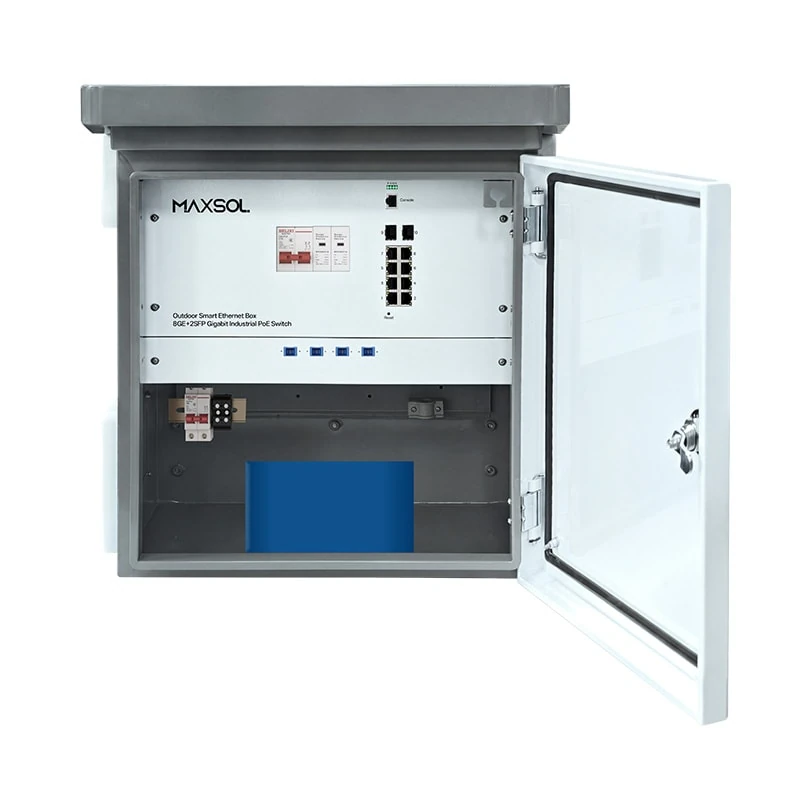
Outdoor PoE Switch Boxes with Battery Backup: Buying Guide
Learn how to choose an outdoor PoE switch box with battery backup, fibre uplinks and protection for dependable Malaysian surveillance sites.
By Maxsol Team

An outdoor PoE switch box with battery backup combines network switching, PoE power distribution and protected power storage in one weather-resistant enclosure. It can simplify deployments for CCTV cameras, wireless access points, outdoor bridges and other edge devices where an indoor rack is impractical.
For Malaysian installations, select the box around six essentials: enclosure protection, actual PoE load, fibre or copper uplink distance, AC supply quality, lightning and surge protection planning, and the backup time required during a mains outage. A built-in battery does not provide a fixed runtime; it depends mainly on the battery’s usable energy, connected load, temperature, battery condition and UPS conversion losses.
Why integrate switching and power outdoors
An integrated outdoor box places the PoE switch close to the cameras, APs or wireless bridges it serves. Instead of running several long copper data cables back to an indoor switch, installers can run an uplink—often fibre—to the outdoor location, then use shorter PoE cable runs to the connected devices.
This approach is useful for sites such as:
- Perimeter CCTV coverage around warehouses, factories or campuses
- Car parks, guard houses and entrance lanes
- External Wi-Fi coverage for compounds and open areas
- Pole- or wall-mounted wireless bridge endpoints
- Solar or mains-assisted remote monitoring points
- Construction, logistics and temporary project sites with distributed devices
Practical advantages
A combined switch-and-power enclosure can reduce the number of separate boxes, power adaptors and field terminations. It also gives the designer one location to assess for power isolation, cable entry, earthing and future maintenance.
However, integration does not remove the need for sound system design. The enclosure still needs a suitable mounting surface, correctly sealed cable glands, safe AC isolation, a proper earth path where required, and enough capacity for the PoE load. The equipment inside is only one part of the outdoor system.
When a separate design may be better
A standalone switch and separate UPS or power cabinet may be preferable when:
- The required battery capacity is much larger than a compact integrated system can accommodate.
- Devices are spread over several areas rather than concentrated at one point.
- Site power is already supplied by a central DC plant.
- The project needs a specific power architecture, such as solar charging, generator integration or a larger battery bank.
- Maintenance policy requires networking and electrical equipment to be separated.
Enclosure and environmental checks
Outdoor network equipment must be selected for the installed environment, not simply the location description on a drawing. “Outdoor” can include exposed walls, sheltered eaves, roadside poles, roof structures and equipment yards—each with different heat, rain, dust and access conditions.
Start with the ingress-protection rating
An IP rating indicates resistance to solid objects and water under defined test conditions. For example, IP65 is generally intended to protect against dust ingress and water jets. It does not mean the enclosure can be submerged, continuously flooded or installed with damaged seals.
The verified Maxsol SBOX2802SFG-I and SBOX1802SFG-I are IP65 smart boxes. This is an important starting point for exposed installations, but final protection depends heavily on installation workmanship.
Check the following before specifying any enclosure:
- Mounting orientation: Follow the product installation guidance, especially where cable entries and drainage are concerned.
- Cable entry sealing: Use correctly sized glands and sealing inserts. An unused or poorly tightened entry can defeat the enclosure rating.
- Cable drip loops: Form a drip loop where appropriate so water does not track directly into a gland.
- Sun and heat exposure: A sealed metal enclosure can heat up in direct afternoon sun. Assess the mounting position and the operating-temperature requirement of every device inside and connected to it.
- Condensation risk: Temperature changes can create internal moisture. Check whether the intended enclosure design includes a suitable approach for condensation management.
- Corrosive environments: Coastal, industrial or chemical exposure may require extra attention to mounting hardware, connectors, gland materials and preventive maintenance.
- Physical security: Position the box to reduce tampering while retaining safe access for servicing.
Plan outdoor cabling as a system
Do not consider the box in isolation. Copper Ethernet cable leading outdoors can conduct electrical surges between zones. Fibre uplinks are often selected where long distance, electromagnetic interference or electrical separation is a concern, but the complete design still requires appropriate protection and earthing practices.
For every cable entering the cabinet, record:
- Its purpose: AC input, fibre uplink, copper uplink, PoE endpoint, alarm or earth.
- Its route and approximate length.
- Whether it leaves the building or crosses between outdoor structures.
- Its protection method and earthing arrangement.
- The connector and termination responsibility.
This documentation makes commissioning and future fault-finding much easier.
AC input and surge-protection questions
Where the box uses mains power, confirm that the available supply matches the equipment input requirement and that a suitably rated local isolator or protective device is included in the overall electrical design.
Surge protection should be evaluated at the system level, particularly at exposed Malaysian sites where lightning activity and long external cable routes can raise risk. Check the product documentation and project electrical design for:
- AC-side surge protection and its replacement or status indication method
- Ethernet surge protection for copper lines that enter or leave the protected zone
- Correct protective earth connection and bonding
- Separation between AC wiring and data cabling inside the enclosure
- Protection coordination between building-level and point-of-use devices
Do not assume that an IP-rated enclosure automatically includes surge protection, or that a surge-protection component eliminates the need for proper earthing.
Managed versus unmanaged switching
The choice between a managed and unmanaged outdoor PoE switch depends on how much visibility and control the site needs after installation.
A managed switch is normally the better fit for multi-device surveillance, wireless networks or sites where remote troubleshooting matters. An unmanaged switch is suitable when the network design is straightforward and the priority is simple local deployment.
Choose managed switching when control matters
Managed Layer 2 switching can support a more structured edge network. Depending on the switch’s supported functions and configuration, it can help administrators separate traffic, monitor ports and apply network policies. Confirm the exact management interface, protocol support and available functions before finalising a design.
The Maxsol SBOX2802SFG-I managed outdoor smart box combines 8 Gigabit PoE ports, 2 Gigabit SFP slots, Layer 2 management, AC100-240V input and a built-in 240W DC55V UPS module in an IP65 enclosure.
This type of arrangement is worth considering when you need:
- Eight local PoE connections at an outdoor aggregation point
- Fibre-capable uplinks through SFP slots
- Layer 2 management for an organised edge network
- A UPS module as part of the integrated power architecture
- A platform that can be assessed for future monitoring and segmentation needs
Management does add responsibility. The project should define IP addressing, login access, configuration backups, VLAN design where used, port labelling and a handover process. A managed switch left with undocumented settings can be harder to support than a simpler unmanaged installation.
Choose unmanaged switching for a simpler edge
An unmanaged switch does not require day-to-day network configuration for basic forwarding. This can reduce setup time for a small, fixed layout where all endpoints belong to the same network design and local troubleshooting is acceptable.
The Maxsol SBOX1802SFG-I unmanaged outdoor smart box is IP65 and provides 8 Gigabit PoE ports, 2 Gigabit SFP slots and a 300W power supply. It includes DIP-selectable watchdog, isolation, VLAN and priority functions, plus QoS.
DIP-selectable features can be useful for installers who need practical edge controls without a full managed-switch workflow. Nevertheless, confirm exactly how each mode affects port communication and network behaviour before enabling it. For example, an isolation or VLAN mode may intentionally limit communication between connected ports.
Questions to settle before choosing
Use a managed model when the answer to one or more of these questions is “yes”:
- Do you need to monitor or troubleshoot ports after installation?
- Will camera, wireless, access-control or other traffic need separation?
- Is the site part of a larger managed network?
- Does the handover require switch configuration records?
- Will the edge location grow or change over time?
An unmanaged option may be enough when the topology is stable, endpoint count is known, network segmentation is not required at the switch, and the installer can access the site readily for support.
UPS and battery-backup requirements
A UPS module bridges short or extended mains interruptions, but only if its output capability and battery energy suit the real load. Start by calculating the power demand, then decide the outage duration the system must support.
The Maxsol SBOX2802SFG-I-288WH battery-backup smart box adds a built-in 48V 6Ah 288Wh LiFePO4 battery to the SBOX2802SFG-I configuration. It retains the IP65 enclosure, 8 Gigabit PoE ports, 2 Gigabit SFP slots, Layer 2 management, AC100-240V input and built-in 240W DC55V UPS module.
Calculate the connected load, not just the port count
Eight PoE ports do not mean every installation consumes the same amount of power. Cameras may draw more power at night when infrared lighting is active. PTZ cameras can have higher demand while moving or using heaters. Wireless APs, bridges and PoE extenders also vary by operating condition.
Create a load schedule containing:
| Item | What to record |
|---|---|
| PoE endpoint | Camera, AP, bridge, intercom or other powered device |
| Quantity | Number of identical devices |
| Normal power draw | Typical operating consumption from the endpoint documentation |
| Peak power draw | Maximum expected draw, including night or movement conditions where relevant |
| PoE class or input requirement | Confirm supported PoE method and voltage requirements |
| Non-PoE load | Any additional DC equipment supplied by the power design |
| Growth allowance | Spare capacity for planned additions |
Add the expected peak loads, then compare the result with the switch’s available PoE budget and the UPS module’s output capability. These are separate checks: a switch may have enough physical ports but insufficient power budget for the selected endpoints.
Estimate backup duration carefully
A basic planning estimate is:
Estimated runtime (hours) ≈ usable battery energy (Wh) ÷ actual system load (W)
For a 288Wh nominal battery, a hypothetical 72W load gives a simple estimate of four hours before real-world allowances. Actual runtime will be lower or different depending on UPS losses, battery management limits, battery age, ambient temperature, recharge state and load variation.
Use the calculation only to compare design options. For a critical deployment, define a conservative target and validate the complete system under expected operating conditions. Avoid promising a fixed number of backup hours unless the exact load profile and operating conditions have been verified.
Battery questions procurement teams should ask
Before approving an outdoor PoE switch box with battery backup, confirm:
- Is the stated battery energy nominal or usable under the intended conditions?
- What is the expected load during day, night and peak activity?
- Does the design need to carry all devices during an outage, or only critical cameras and communications?
- What is the UPS output voltage and power limit?
- How does the system behave when the battery reaches its low-voltage threshold?
- What recharge time is expected after an outage, and is the site’s AC supply reliable enough for it?
- Can the battery be serviced or replaced according to the product documentation?
- Are there requirements for battery monitoring, maintenance records or periodic inspection?
For long autonomy requirements, reducing the load can be as effective as increasing battery capacity. Prioritise essential devices, avoid unnecessarily high-power endpoints and consider whether cameras need every feature active during an extended outage.
Compare three Maxsol smart boxes
The following comparison uses only the product details summarised for this guide. Items not listed should be confirmed from the relevant product documentation before purchase or design approval.
| Model | Switching approach | Ports and uplinks | Enclosure | Power and backup context | Best starting point |
|---|---|---|---|---|---|
| SBOX2802SFG-I | Layer 2 managed | 8 Gigabit PoE ports, 2 Gigabit SFP slots | IP65 | AC100-240V input; built-in 240W DC55V UPS module | Managed outdoor PoE aggregation where backup architecture is required |
| SBOX2802SFG-I-288WH | Layer 2 managed | 8 Gigabit PoE ports, 2 Gigabit SFP slots | IP65 | AC100-240V input; built-in 240W DC55V UPS module; 48V 6Ah 288Wh LiFePO4 battery | Managed deployment needing integrated battery energy for outage planning |
| SBOX1802SFG-I | Unmanaged with DIP-selectable functions | 8 Gigabit PoE ports, 2 Gigabit SFP slots | IP65 | 300W power supply; DIP-selectable watchdog, isolation, VLAN and priority; QoS | Straightforward outdoor PoE deployment requiring simple local controls |
The first two options should not be assumed to have the same backup performance: the 288Wh version specifically includes the built-in LiFePO4 battery, while the standard SBOX2802SFG-I is described as having the built-in UPS module. Confirm the complete backup configuration for the selected model.
Likewise, do not treat the 300W power-supply rating of the SBOX1802SFG-I as a guaranteed available PoE budget. Check the model documentation for its PoE allocation, endpoint compatibility and any conditions affecting total output.
Installation planning checklist
A good outdoor network installation is prepared on paper before the cabinet is mounted. Use this checklist during design review, site survey and commissioning.
Network and uplink
- Count current and planned PoE endpoints.
- Record the normal and maximum power draw for each endpoint.
- Confirm whether the uplink will use copper Ethernet or fibre.
- For SFP uplinks, confirm optic type, connector type, fibre type, speed and link distance.
- Verify the selected fibre modules are compatible with the switch SFP slots.
- Define VLAN, addressing and management access requirements where applicable.
- Label every port, cable and remote endpoint in the as-built documentation.
Power, UPS and battery
- Verify the available AC source matches the box input requirement.
- Provide suitable isolation and protection as required by the site electrical design.
- Calculate peak PoE load, not only average load.
- Confirm available PoE budget and UPS output capability.
- Calculate a conservative battery runtime estimate using the actual planned load.
- Decide which endpoints remain powered during a prolonged outage.
- Confirm recharging, battery service and replacement requirements.
Outdoor protection and mounting
- Select a mounting position protected from avoidable direct sun, standing water and impact.
- Check wall, pole or structure strength, fixing method and safe maintenance access.
- Use correctly rated outdoor cable and correctly sized cable glands.
- Seal unused entry points.
- Form drip loops where cable routing makes them necessary.
- Keep AC and data routes organised and separated as required.
- Include earthing, bonding and surge protection in the overall site design.
- Inspect gasket condition, cable seals and enclosure fasteners before energising.
Commissioning
- Test every PoE endpoint under normal and high-load conditions.
- Verify fibre link status and expected uplink throughput.
- Confirm managed-switch configuration, passwords and configuration backup where used.
- Test the intended mains-failure behaviour safely.
- Record battery state, load and test conditions rather than quoting an unverified runtime.
- Hand over diagrams, port schedules, settings and maintenance instructions.
Common selection mistakes to avoid
Choosing by port count alone. Eight ports may be enough physically but not electrically. Add up worst-case endpoint demand and leave a sensible design margin.
Assuming “UPS” means a battery is included. A UPS module and a built-in battery are not interchangeable descriptions. Check exactly what the selected configuration contains.
Using nominal battery capacity as a runtime promise. Nominal watt-hours are useful for planning, but actual backup time depends on the full system load and operating conditions.
Ignoring night-time camera load. Infrared illumination, PTZ movement and cold-start behaviour can change power demand. Design around realistic peak use.
Treating IP65 as a complete installation solution. Cable glands, mounting direction, seal condition and cable routing affect the final installed protection level.
Forgetting the uplink design. Two SFP slots are useful only after the correct transceivers, fibre type, termination and link budget have been selected.
Installing surge protection without a proper earth path. Protection devices and bonding must be designed together. Consult qualified electrical personnel for site-specific requirements.
FAQ
Is fibre necessary for an outdoor PoE switch box?
Not always. Copper can be suitable for short, well-protected links within the appropriate Ethernet distance limits. Fibre is often considered for longer links, electrical separation, areas with electromagnetic interference or connections between separate structures. Confirm the SFP module and fibre compatibility before installation.
Can all eight PoE ports run at full load during a power outage?
That depends on the switch’s available PoE budget, UPS output capability, battery energy and the actual demand of all connected devices. Perform a peak-load calculation and verify the model documentation rather than assuming every port can supply its maximum possible endpoint load at once.
How often should an outdoor box be inspected?
Inspection frequency should reflect exposure and criticality. At minimum, include checks for damaged glands, loose fixings, water ingress, cable damage, earth connections, enclosure seals and battery condition as part of the site maintenance plan.
Compare the linked Maxsol models against your required port count, PoE load, fibre distance, AC supply, outdoor environment and management needs before selecting the most suitable configuration.