PoE Power Budget Calculator for Security Cameras
Learn how to calculate PoE power for security cameras, check per-port limits and compare 120W, 300W and 400W switch options.
By Maxsol Team

A PoE power budget calculator for cameras starts with a simple rule: add the maximum simultaneous power demand of every PoE device, then leave practical headroom. However, the total alone is not enough. Each camera must also stay within the power limit of its assigned switch port, and the number of powered devices must not exceed the available compatible PoE ports.
Use this calculation for a first-pass switch selection:
Required PoE budget = total simultaneous device demand × (1 + design headroom)
For example, if a site has cameras, wireless bridges and other powered endpoints, use each device’s stated maximum input power rather than a typical daytime figure. Then check the calculated result against the switch’s published total PoE budget and individual port capability.
Collect each device power requirement
Build a device schedule before choosing a PoE switch. The most reliable source is the manufacturer’s current datasheet for each camera or network device. Record the highest stated power requirement for the operating mode that matters at the site.
For a camera system, this may include:
- Fixed IP cameras
- Dome, turret or bullet cameras
- PTZ cameras
- Cameras with infrared illumination
- Cameras with built-in heaters, blowers or wipers
- Video intercoms and access-control endpoints
- Wireless access points or point-to-point bridges sharing the same switch
- Any other device powered through PoE
Do not base the design only on a camera’s lowest or “typical” consumption. Security cameras can draw more power when infrared LEDs activate after dark, when a PTZ motor moves, or when environmental accessories operate. The applicable figure is the maximum demand that can occur at the same time.
A practical worksheet should contain at least these columns:
| Device or circuit | Quantity | Manufacturer’s maximum input power | Simultaneous operation? | Assigned switch port | Notes |
|---|---|---|---|---|---|
| Camera type A | Yes / No | Include night mode if applicable | |||
| Camera type B | Yes / No | Check accessory demand | |||
| PTZ camera | Yes / No | Check movement and IR conditions | |||
| Wireless endpoint | Yes / No | Confirm PoE standard and input range | |||
| Other PoE device | Yes / No | Record its peak rating |
If a device datasheet gives more than one figure, use the value relevant to the installed configuration. For instance, an outdoor camera without a heater should not be budgeted as though it has one, but a camera supplied with an active heater should not be budgeted using a basic camera-only figure.
Use input power, not an assumed PoE class
PoE standards such as IEEE 802.3af, IEEE 802.3at and IEEE 802.3bt help identify whether a switch and endpoint can negotiate power correctly. They do not replace the camera manufacturer’s own maximum-input specification.
A device may support a higher PoE class than it normally consumes. Conversely, an advanced camera may need more power than an ordinary fixed camera because of illumination, motors or environmental features. Record the actual stated requirement, then verify that both the switch port and the overall budget can support it.
Treat unknown demand as a design gap
Avoid guessing when the power information is incomplete. Request the product datasheet, check the equipment label, or measure the installed device under representative conditions during commissioning. A power figure obtained only in daylight or while a PTZ is idle may not represent the highest load.
Separate per-port limits from total budget
A switch can have enough total watts on paper yet still be unsuitable for one high-demand endpoint. This happens when the specific port supplying that device has a lower limit than the device requires.
There are two separate checks:
- Per-port power limit: Can the assigned port supply the maximum power required by that device?
- Total PoE budget: Can the switch supply all connected PoE loads running at the same time?
Both conditions must pass.
For each endpoint, compare the device’s maximum input demand against the published capability of its intended PoE port. Also confirm that the relevant port supports the required PoE standard. Do not assume every port on a switch has identical capability; port assignments can matter.
Why port assignment matters
Suppose a site includes a higher-power camera and several standard cameras. The higher-power device may need to be connected to a port specifically documented for its required power level. Moving it to another port without checking the specification can cause unstable operation, failed start-up or a device that loses power when its peak load occurs.
Cable condition also deserves attention. Long runs, poor terminations, unsuitable cable, water ingress and voltage drop can affect what reaches the endpoint. The switch budget is a central planning figure, but it does not remove the need for good cabling practice and appropriate distance planning.
Power supply rating and PoE budget are not interchangeable
When comparing switches, distinguish a stated internal power-supply rating from a documented total PoE budget. The number used for your calculator should be the switch’s stated PoE budget unless the manufacturer explicitly defines another figure for PoE output.
This distinction prevents over-allocation. A power supply may support the complete operation of the switch, including its own electronics, while the usable PoE allocation is specified separately.
Add simultaneous load and headroom
After listing every device’s maximum demand, identify which loads can operate together. For most surveillance systems, all cameras should be treated as simultaneous loads because night scenes, alarms or operator activity can affect multiple units at once.
Use this sequence:
- Multiply each device’s maximum power requirement by its quantity.
- Add the loads that can operate at the same time.
- Add a design margin.
- Compare the result with the switch’s total documented PoE budget.
- Recheck the per-port limit for every assigned device.
The margin is not a substitute for correct calculations. It is a reserve for reasonable variation, future changes and the fact that real sites rarely remain static. Choose the margin in line with the project’s risk level, planned expansion and quality of the available device data.
A design with very little spare capacity may work initially but leave no room for an additional camera, a replacement model with a higher peak rating or a future wireless endpoint. It can also make fault-finding harder when the system begins to operate close to its limit.
When all loads should be counted together
Count all endpoint demands together when any of the following is true:
- All cameras can enter night mode at roughly the same time.
- Several PTZ cameras may be controlled simultaneously.
- The switch will also power wireless equipment or access devices.
- A future expansion is expected on the same switch.
- The site is security-critical and power shedding is unacceptable.
- The operation mode is uncertain or managed by different users.
Do not reduce the calculation based on an assumption that only some cameras will be active. IP cameras generally remain powered continuously, and features such as IR illumination may be triggered across many devices after dark.
Work through a neutral calculation method
The following method avoids making assumptions about any particular camera’s wattage. Replace the variables with the maximum input values from your own equipment schedule.
Let:
- F = quantity of fixed cameras
- PF = maximum power of each fixed camera
- P = quantity of PTZ cameras
- PP = maximum power of each PTZ camera
- W = quantity of wireless PoE devices
- PW = maximum power of each wireless device
- O = combined maximum power of any other simultaneous PoE endpoints
- H = chosen headroom as a decimal
First calculate simultaneous endpoint demand:
Device demand = (F × PF) + (P × PP) + (W × PW) + O
Then include headroom:
Required switch budget = Device demand × (1 + H)
Finally, apply these decision checks:
- Is the required switch budget less than or equal to the switch’s documented total PoE budget?
- Does each endpoint fall within the limit of its assigned switch port?
- Is there a suitable PoE-capable port for every endpoint?
- Are the endpoint and port compatible in terms of PoE standard?
- Does the cable route, termination quality and site environment support dependable operation?
If any answer is no, revise the port allocation, use another switch arrangement, reduce the number of loads on that switch or choose equipment with the correct documented power capacity.
A worksheet example without assumed camera consumption
For a mixed installation, write the calculation in this format:
| Load group | Quantity | Maximum device demand | Subtotal |
|---|---|---|---|
| Fixed cameras | F | PF | F × PF |
| PTZ cameras | P | PP | P × PP |
| Wireless endpoints | W | PW | W × PW |
| Other PoE devices | — | — | O |
| Simultaneous device demand | (F × PF) + (P × PP) + (W × PW) + O | ||
| Headroom | H | Device demand × H | |
| Required PoE budget | Device demand × (1 + H) |
This format is useful for Malaysian projects where a single cabinet or comms room may support both CCTV and wireless equipment. It makes shared power demand visible before procurement and installation.
Compare 120W, 300W and 400W examples
The correct switch is not automatically the one with the largest PoE budget. Start with your calculated demand, number of endpoints, per-port needs, uplink design and any anticipated growth. The following examples show how the documented budgets should be used in a comparison, not as assumed camera loads.
| Switch example | Documented PoE information | Practical calculator check |
|---|---|---|
| PS1802G | 120W total PoE budget; ports 7–8 support IEEE 802.3bt up to 60W | Confirm total calculated demand is within 120W and allocate higher-power devices only to suitable ports. |
| PS11602G | 300W internal power supply; documented ports 1–8 support IEEE 802.3af/at up to 30W per port | Confirm the product’s documented PoE budget and port arrangement for the intended configuration; do not treat the internal power-supply rating as a substitute for a stated PoE budget. |
| PS14802SFG | 400W total PoE budget; ports 1–48 support IEEE 802.3af/at up to 30W per port | Confirm total simultaneous demand is within 400W, while ensuring no endpoint needs more than 30W on its assigned port. |
120W: compact deployments and careful high-power port allocation
A 120W total PoE budget can be assessed against a smaller device schedule using the same calculation method. With the PS1802G 120W PoE switch, the documented total PoE budget is 120W, while ports 7–8 support IEEE 802.3bt up to 60W.
The important planning point is not to spread a high-demand endpoint across any arbitrary port. If a device needs the capability documented for ports 7–8, assign it accordingly, then add all other simultaneous loads and verify that the total stays within 120W.
300W: verify the usable PoE figure and documented port roles
For a design being considered around the PS11602G 16-port Gigabit PoE switch with two uplink ports, the documented information states a 300W internal power supply and IEEE 802.3af/at support of up to 30W per port on ports 1–8.
This means a buyer should confirm the current product documentation for the actual total PoE budget, the powered-port layout and the port assignment before finalising the calculation. A 300W internal power supply should not be entered automatically as a 300W PoE budget unless the documentation specifically identifies it as such.
400W: larger endpoint counts still need per-port checks
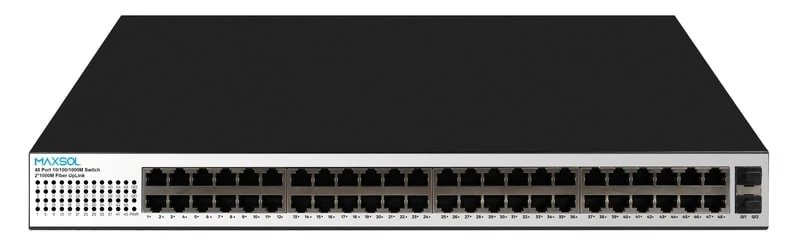
The PS14802SFG 48-port Gigabit PoE switch with two uplink ports has a documented 400W total PoE budget. Its ports 1–48 support IEEE 802.3af/at up to 30W per port.
A 400W budget may suit a larger device schedule, but the arithmetic remains the same: add maximum simultaneous demand, include headroom and stay within 400W. Also check every endpoint against the 30W per-port limit. Forty-eight PoE-capable ports do not mean that forty-eight devices at the maximum per-port level can necessarily operate within a 400W shared budget.
Recheck the design before installation
Carry out a final power review after the camera models, mounting accessories and cable routes are confirmed. This step is especially important when substitutions have occurred between quotation, purchasing and installation.
Use this pre-installation checklist:
- Every device has a recorded manufacturer-stated maximum power requirement.
- Night mode, IR illumination, PTZ movement and environmental accessories have been considered where applicable.
- Every PoE endpoint has been included, not only cameras.
- Simultaneous loads have been added correctly.
- A suitable design headroom has been included.
- The total is within the switch’s documented total PoE budget.
- Each device is assigned to a port with adequate documented power capability.
- The required IEEE PoE standard is supported at both ends.
- The number of connected powered devices matches the usable PoE-port plan.
- Cabling, connectors, surge protection approach and outdoor enclosures have been reviewed for the site conditions.
- The upstream network, uplinks and recording infrastructure have been checked separately from the power calculation.
Common PoE budgeting mistakes
Using typical consumption instead of maximum demand.
This can lead to a system that appears stable during commissioning but fails when IR or other peak-load functions activate.
Checking only total watts.
A camera can still be unsuitable if its assigned port cannot supply its required power level.
Assuming every port is equivalent.
Read the port-specific specification, particularly where a switch includes ports with different PoE capabilities.
Equating the power-supply rating with the PoE budget.
Use the documented PoE output budget in the calculation, not a power-supply figure unless it is explicitly specified as the available PoE budget.
Ignoring non-camera PoE endpoints.
Wireless access points, bridges and access devices can materially affect the shared budget.
Leaving no allowance for changes.
A design operating at the limit has less flexibility when adding devices or changing camera models later.
FAQ
How much PoE power should I allow per security camera?
Use the maximum input power stated by that specific camera manufacturer for its installed configuration. Do not apply one generic wattage to all cameras, because power demand varies with features such as IR illumination, PTZ motors and environmental accessories.
Should I add headroom to a PoE power budget?
Yes. Add headroom after calculating the maximum simultaneous load. The appropriate margin depends on site risk, equipment certainty and expected expansion, but it should not replace accurate device-level figures.
Can a 400W PoE switch power 48 devices?
It depends on the combined device demand and the per-port limit. For the PS14802SFG example, the documented total PoE budget is 400W and ports 1–48 support up to 30W per port. Both limits must be met.
Does a higher port count guarantee enough PoE power?
No. Port count, per-port capability and total PoE budget are separate specifications. Review all three before selecting a switch.
Compare the linked Maxsol models against your required port count, calculated simultaneous load, cable distances, available power source, installation environment and network management requirements before making a final selection.