Managed vs Unmanaged PoE Switches: Malaysia Buying Guide
Compare managed and unmanaged PoE switches for cameras, wireless links and industrial sites. Assess VLANs, diagnostics, redundancy and deployment needs.
By Maxsol Team

A managed PoE switch is the better choice when you need to separate network traffic, diagnose faults remotely, monitor ports, or build resilience into a site. An unmanaged PoE switch is often the practical choice for a small, self-contained camera or access-point network where plug-and-play operation matters more than detailed control.
The right managed vs unmanaged PoE switch decision is not about choosing the “better” category. It is about matching the switch to the number of devices, network risk, site access, troubleshooting expectations, and future expansion plan. For many Malaysian surveillance and SMB installations, an unmanaged switch can be entirely suitable at the edge, while managed switching is more valuable at aggregation points, larger premises, outdoor enclosures and sites that are difficult to visit.
What unmanaged switches provide
An unmanaged PoE switch forwards Ethernet traffic automatically and supplies Power over Ethernet to compatible powered devices, such as IP cameras, wireless access points, intercoms and some network bridges. There is usually no web interface, command-line configuration or requirement to create network policies before devices can communicate.
This simplicity has clear benefits:
- Fast installation: connect the uplink and powered devices, then verify link and power indicators.
- Lower configuration workload: installers do not need to define VLANs, port profiles or monitoring rules.
- Fewer settings to maintain: useful when a small network has a straightforward layout and one owner.
- Predictable field replacement: a like-for-like unit can usually be swapped without restoring a configuration file.
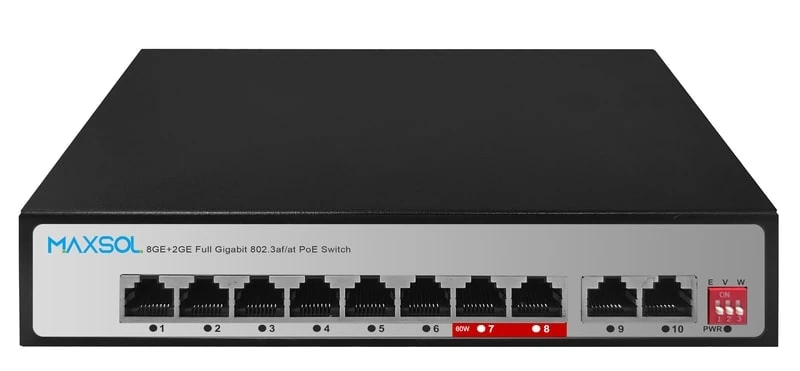
Unmanaged does not always mean completely featureless. Some devices offer hardware-selected operating modes that handle common edge-installation needs without a management interface. For example, the Maxsol PS1802G unmanaged eight-port Gigabit PoE switch includes DIP-selectable Extend, VLAN isolation and AI watchdog modes. These are fixed, switch-level functions rather than the granular configuration and visibility available from a managed switch.
Where an unmanaged switch has limits
The main trade-off is visibility and control. If one camera stops responding, an unmanaged switch may show that a physical link exists, but it generally cannot tell you as much about traffic behaviour, VLAN assignment, packet handling or the condition of each port as a managed model can.
An unmanaged design also normally places connected devices in the same Layer 2 network segment unless separation is provided by another part of the network. This may be fine for a dedicated, isolated CCTV run. It becomes less suitable when cameras, staff computers, visitor Wi-Fi, point-of-sale equipment and building systems share the same switching infrastructure.
Before selecting an unmanaged PoE switch, confirm:
- The total PoE demand of all connected devices, including any higher-power camera functions.
- The power budget of the switch, not merely the number of PoE ports.
- Device PoE standards and whether each powered device is compatible.
- Copper cable distance and cable quality between the switch and endpoint.
- The required uplink type and speed.
- Whether the switch location needs a particular enclosure, grounding arrangement or environmental protection.
- Whether you will need traffic segmentation or remote diagnostics later.
A common mistake is calculating only the normal power draw of cameras. Infrared lighting, heaters, PTZ movement, speaker use or cold-start behaviour can increase demand. Plan against the relevant device power requirement and leave operational headroom rather than designing at the limit.
What management adds
A managed PoE switch provides a configuration and monitoring layer over basic forwarding and power delivery. Depending on the model, this can include a web interface, SNMP support, VLAN configuration, Quality of Service (QoS), port statistics, multicast controls, link event information and redundancy functions.
Management is valuable because it helps an installer or network team answer practical questions without immediately travelling to site:
- Is the device connected to the intended port?
- Is the port carrying unexpected traffic?
- Is a link repeatedly dropping and reconnecting?
- Has a network loop been introduced?
- Are camera streams affecting office or wireless traffic?
- Is multicast traffic being forwarded where it is not needed?
- Has an uplink or ring path failed?
This visibility can reduce guesswork, but only when the switch is configured sensibly and access to the management interface is protected. A managed switch installed with default credentials, no documented IP address and no configuration backup may create more support work than it saves.
Useful management functions for PoE deployments
VLANs divide one physical switching infrastructure into logical network segments. A security integrator might separate IP cameras from office devices, while retaining controlled access to an NVR or video management server. A wireless planner may separate management, staff and guest traffic where the wider design requires it.
QoS can prioritise selected traffic. This can be useful where real-time camera, voice or operational traffic shares constrained links. It is not a substitute for sufficient uplink capacity; prioritisation cannot create bandwidth that does not exist.
LLDP can help identify connected network devices and support more structured port administration where supported by the network design.
IGMP Snooping controls multicast forwarding more efficiently in networks that use multicast. It should be configured with an understanding of the application, because incorrect multicast settings can disrupt service discovery or video distribution.
SNMP and port monitoring can integrate a switch into a monitoring system, allowing teams to observe status, receive alerts and investigate recurring issues.
Static routing is available on some managed switches, but it should not be selected simply because it appears in a feature list. Confirm whether routing is genuinely needed, how inter-VLAN security will be enforced, and whether a firewall or dedicated router is the correct place for that role.
Management requires operational discipline
A managed switch should be treated as network infrastructure, not just a powered port extender. Document at least:
- Management IP address, subnet and access method.
- Administrator credentials and password-management process.
- VLAN IDs, port memberships and uplink trunk settings.
- PoE load assumptions and connected endpoint list.
- Firmware and configuration backup procedure.
- Who is authorised to make changes.
For a small project, this documentation can be a simple handover sheet. For multi-site deployments, it should sit within the client’s normal network records. The time spent documenting the design is usually much less than the time spent tracing an undocumented port several months later.
VLAN, monitoring and redundancy questions to ask
VLANs, monitoring and redundancy are reasons to consider managed switching, but they only add value if they solve an identified operational problem.
Do you need VLAN separation?
Choose VLAN-capable switching when devices with different roles need to share the same cabling or upstream network but should not sit in one unrestricted broadcast domain.
Typical examples include:
- CCTV cameras and recorders sharing a building network with office users.
- Wireless access points carrying separate staff, guest and management networks.
- A warehouse camera network connected to an operational network through a controlled uplink.
- Multi-tenant, campus or distributed-premises designs where traffic boundaries must be clear.
VLANs must be designed end to end. It is not enough to assign a camera port to a VLAN on one switch. The uplink, router, firewall, NVR, server and any downstream switches must also have the correct tagging, untagging and access rules. Misaligned VLAN settings are a frequent cause of “connected but unreachable” devices.
If a switch only offers a hardware VLAN isolation mode, understand its scope before relying on it. Port isolation can be useful for a simple camera arrangement, but it is not automatically equivalent to a complete VLAN architecture across multiple switches and routed networks.
Do you need monitoring rather than a site visit?
Managed monitoring is especially helpful if the site is geographically dispersed, mounted high in an outdoor location, inside a controlled-access building or costly to visit. Port state, interface statistics and event information can narrow the fault domain: endpoint, cable, power, switch port, uplink or upstream network.
However, monitoring does not repair poor physical installation. Use suitable cable, protect outdoor runs appropriately, maintain good terminations and plan power protection at the system level. A dashboard cannot compensate for water ingress, damaged cable or an undersized power source.
Do you need redundancy?
Redundancy is justified where loss of network connection has a meaningful operational impact and the rest of the network can support an alternative path. It may involve dual uplinks, fibre paths, ring designs, redundant power arrangements or a combination of these.
For Ethernet rings, all participating equipment and topology choices must support the selected protection method. Do not form a physical loop with unmanaged switching in the hope that traffic will “find another route”; uncontrolled loops can cause a broadcast storm and take down the network.
ERPS is one example of a ring protection feature found on suitable managed equipment. It is relevant only when the connected devices, topology and configuration are designed around it. A simple radial camera network with one uplink generally gains little from an unneeded ring feature.
When a simple camera network can remain unmanaged
A small camera network can remain unmanaged when it is dedicated, physically straightforward and does not need advanced network policy or remote troubleshooting. This is common for a compact premise where several cameras connect to one nearby switch and one uplink leads directly to the recorder or a clearly separated network point.
An unmanaged PoE switch is a reasonable fit when all of the following are true:
- The network has a small, known number of cameras or other PoE devices.
- Endpoints have been checked for PoE and power compatibility.
- The switch has sufficient power budget with headroom.
- One uplink is adequate and there is no requirement for automatic path failover.
- Cameras do not need to share the switching segment with unrelated user devices.
- There is no requirement for per-port monitoring, SNMP or detailed traffic statistics.
- An installer can access the switch reasonably easily if a fault occurs.
- Future growth is limited or a planned upgrade path exists.
For instance, a small shop lot, guardhouse, storeroom or single gate installation may not require managed switching if the camera network is purposely kept simple. In such cases, correct PoE sizing, dependable cabling, sensible recorder placement and labelling may matter more than advanced configuration.
Even on an unmanaged deployment, label both ends of every cable, record the port-to-camera mapping and retain the basic network addressing details. These low-cost steps make future maintenance much easier.
Compare approved Maxsol examples
The following examples illustrate how switch category and installation context affect the decision. They should not be treated as a complete specification comparison; confirm current product documentation, power requirements, PoE compatibility, environmental suitability and the overall system design before specifying any model.
| Example | Management approach | Relevant verified context | Best considered for |
|---|---|---|---|
| PS1802G | Unmanaged | Eight-port Gigabit PoE switch with DIP-selectable Extend, VLAN isolation and AI watchdog modes | Straightforward edge networks that favour simple deployment and selected hardware modes |
| PS2802SFG-I-BT | Managed industrial DIN-rail | 8GE plus 2 SFP managed industrial PoE switch with Web and SNMP management, VLAN, QoS, LLDP, IGMP Snooping, ERPS and static routing | Projects requiring configurable traffic handling, monitoring or industrial DIN-rail installation |
| SBOX2802SFG-I | Managed industrial smart Ethernet box | Eight Gigabit PoE ports, two Gigabit SFP slots, Layer 2 management, IP65 protection and built-in 240W UPS power module | Outdoor or protected-box designs where the stated enclosure and integrated power context fit the wider project |
For a managed DIN-rail option, the Maxsol PS2802SFG-I-BT managed industrial PoE switch provides Web and SNMP management alongside VLAN, QoS, LLDP, IGMP Snooping, ERPS and static routing functions. Its two SFP ports may be relevant where the network design calls for fibre uplinks, but the required transceiver type, fibre path, distance and interoperability should all be confirmed separately.
The Maxsol SBOX2802SFG-I managed industrial smart Ethernet box combines Layer 2 management, eight Gigabit PoE ports and two Gigabit SFP slots with IP65 protection and a built-in 240W UPS power module. For an outdoor project, evaluate the entire installation rather than the box alone: cable entry, mounting, heat exposure, earthing, upstream connectivity, battery-related requirements and site service access all influence the final result.
The key distinction is not simply “industrial equals managed” or “unmanaged equals basic”. Select the operational functions you can explain and will maintain. A managed switch with unused features may be unnecessary; an unmanaged switch deployed where segmentation and diagnostics are essential can become a limitation.
Decision checklist
Use this checklist before finalising a managed or unmanaged PoE switch.
1. Map the endpoints and traffic
List every camera, access point, bridge, intercom or other powered device. Record its location, network role, normal and maximum power requirement, expected data use and required uptime. Include devices planned for the next expansion phase where practical.
2. Calculate PoE capacity properly
Add the power requirements of all endpoints likely to operate simultaneously. Compare this total with the switch’s documented PoE budget, then allow a margin for expected peak conditions and expansion. Also confirm the supported PoE standard for each endpoint.
Do not assume a switch with eight PoE ports can power eight devices at any power level. Port count and total power budget are separate constraints.
3. Check cabling and uplinks
Verify copper cable lengths, termination quality and the intended uplink. Where fibre is proposed, confirm the SFP module type, connector, fibre type, link budget and equipment at the far end. A managed switch cannot solve an incorrect fibre or uplink design.
4. Decide whether segmentation is a requirement
Ask whether CCTV, Wi-Fi, office devices and operational technology must be separated. If yes, define VLANs and the routing or firewall rules between them before choosing the hardware. If the network is a single dedicated camera segment, advanced VLAN configuration may not be necessary.
5. Define the support model
Who will investigate a failed camera at 9 pm? If they need to assess port status remotely, managed monitoring may be worthwhile. If the site is local, small and simple, physical checks may be an acceptable support process.
6. Assess resilience realistically
Identify the actual consequence of an uplink, power or switch failure. If continuity is required, design redundancy across the relevant components, not just one switch feature. If brief downtime is acceptable, a simple radial topology may be clearer and easier to maintain.
7. Match the installation environment
For cabinet, DIN-rail or outdoor work, inspect the full physical environment: mounting space, cable routing, access, temperature exposure, moisture, dust, grounding and upstream power arrangement. Check documented product ratings and installation instructions for the exact model being considered.
8. Budget for ownership, not only purchase
An unmanaged switch may reduce initial configuration time. A managed switch may reduce diagnosis time, support segmentation and simplify monitoring in a larger deployment. Compare the labour and operational implications for the actual site instead of assuming either option is always lower cost.
Common selection mistakes
Choosing managed hardware without a configuration plan. VLANs, QoS and redundancy need deliberate design. If nobody will configure and document them, simple hardware may be a better outcome.
Choosing unmanaged hardware for a shared network. When CCTV and business traffic share infrastructure, lack of segmentation can make troubleshooting and security policy more difficult.
Ignoring total PoE demand. Check the aggregate budget and peak device behaviour, not just the quantity of ports.
Treating port isolation as a complete security design. Isolation modes can be useful, but they do not replace end-to-end VLAN, firewall, password and device-management practices where those are required.
Building a loop without a supported design. Redundant links require a planned loop-prevention or ring-protection approach. Never add a second cable path blindly.
Forgetting the uplink bottleneck. Multiple high-resolution camera streams can converge on one uplink. Validate uplink capacity and recorder or server connectivity as part of the whole design.
FAQ
Is a managed PoE switch more secure than an unmanaged switch?
It can support a more controlled design through functions such as VLANs and managed access, but it is not automatically secure. Security also depends on correct configuration, strong credentials, access control, endpoint hardening, network architecture and ongoing maintenance. An unmanaged switch on a physically separate, dedicated camera network can still be appropriate for a low-complexity deployment.
Can unmanaged PoE switches use VLANs?
An unmanaged switch generally does not let you configure conventional VLAN membership through a management interface. Some models provide a fixed VLAN isolation mode through a physical selector. Check exactly what that mode isolates and how it affects the uplink before designing around it.
Do IP camera systems always need managed switches?
No. A dedicated, small camera system with a suitable PoE budget and uncomplicated topology can work well with unmanaged switching. Managed switches become more compelling when the system is larger, shared with other network services, remotely supported or expected to use segmentation, monitoring or resilient links.
Should a fibre uplink mean I need a managed switch?
Not necessarily. Fibre uplinks solve a physical connectivity requirement, such as distance or electrical isolation. Management may be useful for monitoring, VLANs or resilience, but it should be chosen based on those operational needs rather than the presence of fibre alone.
Compare the linked Maxsol models against your required port count, PoE load, cable distance, uplink type, installation environment and need for management before making a final specification.