Solar CCTV for Temporary Construction Sites
Plan solar CCTV for Malaysian construction sites with practical guidance on load budgets, changing shade, connectivity, relocation and recommissioning.
By Maxsol Team

Solar CCTV for construction sites works best as a relocatable system rather than a permanent installation made smaller. The design must support changing camera positions, new sources of shade, exposed equipment, shifting network links and repeated commissioning as the project advances.
Start by mapping surveillance priorities and calculating the complete day-and-night electrical load. Then select a modular power, mounting and backhaul arrangement that can be moved without improvising new connections each time. After every relocation, reassess solar exposure, alignment, electrical protection, recording and remote access.
Map temporary surveillance requirements
A construction site rarely remains visually or physically consistent. Hoarding moves, access gates change, structures rise, scaffolding appears and valuable materials shift between storage areas. A camera position that covers the site well during earthworks may become blocked during structural work.
Define surveillance zones according to project phase rather than assuming one fixed layout will last until handover.
Typical temporary priorities include:
- Entry and exit points
- Material storage and plant parking
- Fuel or generator areas
- Temporary site offices
- Delivery and loading zones
- Boundary gaps or less visible approaches
- Newly completed floors awaiting permanent security systems
- High-value equipment that moves between work areas
For each location, record the required field of view, night operation, recording method, network path and likely relocation date. This helps installers distinguish between cameras that may stay in place for several months and units that could move every few weeks.
Design around surveillance outcomes
Do not begin by asking only how many cameras fit on one solar system. First establish what each camera must achieve.
Questions to answer include:
- Is the camera intended for general overview, event verification or detailed identification?
- Will infrared illumination, white light, audio or motorised movement be used?
- Is continuous recording required, or will recording be triggered by events?
- Will footage be stored locally, sent to a recorder or viewed remotely?
- How quickly might the surveillance point need to move?
- Could cranes, stacked materials, containers or new walls obstruct the view?
- Is there a clear network path back to the site office or monitoring point?
A temporary design should also document the intended mounting height and safe access method. Mounting a system where it cannot be serviced without disrupting site operations can turn a minor adjustment into a costly mobilisation exercise.
Divide the project into relocation phases
A simple phase plan makes movement more predictable:
| Project phase | Likely surveillance focus | Design implication |
|---|---|---|
| Site establishment | Hoarding, gates and temporary offices | Prioritise rapid installation and broad coverage |
| Ground and structural work | Plant, materials and active work areas | Expect frequent obstruction and vibration |
| Building enclosure | Internal access and completed zones | Reassess outdoor camera positions and backhaul |
| Fit-out | Stored equipment and restricted areas | Cameras may move to entrances or internal approaches |
| Pre-handover | Finished assets and remaining temporary works | Plan removal without affecting permanent systems |
The exact phases will vary, but recording them helps procurement teams specify reusable brackets, cables, cabinets and power modules instead of treating every move as a new installation.
Budget camera, radio and night loads
A solar power budget must cover every device operating from the system—not only the camera’s headline wattage. Include the camera, night illumination, radio or cellular router, PoE conversion, recorder if present, controller consumption and reasonable conversion and cable losses.
Use the highest credible operating load for critical design checks. Camera power can rise at night when infrared LEDs switch on, and motorised functions or heaters can create additional peaks where fitted.
Build separate day and night calculations
A practical load sheet should include:
| Load item | Day input | Night input | Hours active | Source of figure |
|---|---|---|---|---|
| Camera | Confirm | Confirm | Confirm | Current camera datasheet |
| Infrared or white light | Confirm | Confirm | Confirm | Camera or illuminator datasheet |
| Wireless radio | Confirm | Confirm | Confirm | Current radio datasheet |
| Cellular router | Confirm | Confirm | Confirm | Current router datasheet |
| PoE converter | Calculate | Calculate | Continuous or scheduled | Converter datasheet |
| Local recorder or switch | Confirm | Confirm | Confirm | Current equipment datasheet |
| Cable and conversion losses | Allow explicitly | Allow explicitly | As applicable | Design assumption |
Do not treat a nominal battery watt-hour rating as fully usable delivered energy. Battery protection limits, charging state, temperature, conversion losses, cable loss and the controller’s operating behaviour all affect what reaches the load.
Hypothetical load-budget example
The following figures are hypothetical assumptions for explaining the calculation method. They are not measured performance for a Maxsol product or a recommendation for a particular camera.
Assume:
- Camera consumption: 7W during daylight
- Camera consumption with night illumination: 12W
- Radio consumption: 6.5W continuously
- Day period for calculation: 12 hours
- Night period for calculation: 12 hours
- Additional design allowance: 15%
The assumed daily energy demand before the allowance would be:
- Day:
(7W + 6.5W) × 12h = 162Wh - Night:
(12W + 6.5W) × 12h = 222Wh - Total:
384Wh per day
Applying the hypothetical 15% allowance gives approximately 442Wh per day. This result is only a planning illustration. It does not establish autonomy, charging sufficiency or guaranteed runtime. Actual calculations must use verified equipment consumption, realistic operating schedules and the system’s usable delivered energy.
Match the power architecture, not just the panel label
The Maxsol CS12060 120W and 768Wh solar system documents a 120W monocrystalline panel, 12.8V 60Ah 768Wh LiFePO4 battery, MPPT controller and three DC12V outputs. RS485 is optional.
These are selection inputs, not a runtime guarantee. Before specifying the system, confirm the current controller limits for PV voltage, current and power, as well as battery charging temperatures and protection behaviour. The nominal 768Wh rating should not be interpreted as 768Wh of usable energy at the camera.
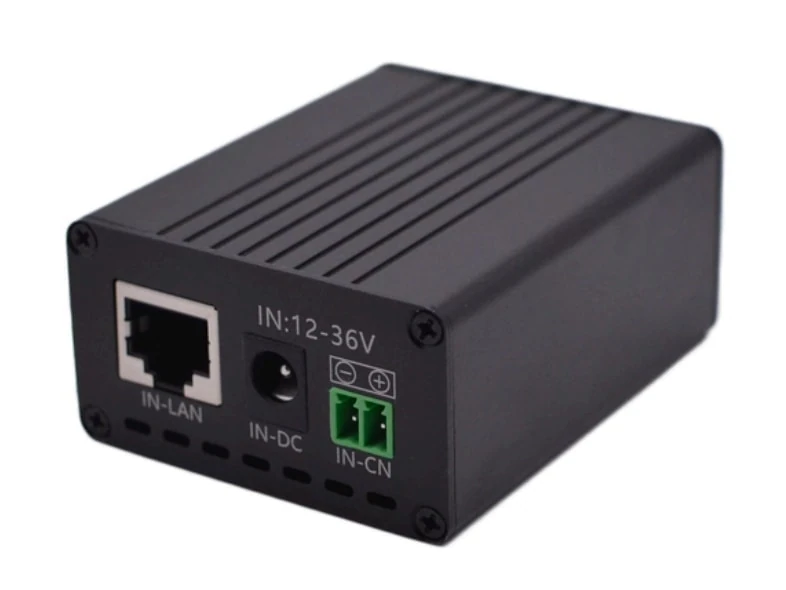
Where a camera or radio requires PoE from a DC solar supply, the Maxsol POE24V DC-to-PoE converter accepts 12–36V DC and provides adjustable 12–57V PoE output, Gigabit Ethernet and an LCD voltage display. Its documented continuous load when converting 12V to 48V is no more than 30W.
The stated conversion efficiency of up to 94% is a maximum, not a value to assume for every operating condition. IEEE powered-device detection or negotiation is not established by the supplied facts. Confirm voltage, polarity, pinout, protocol and power requirements before connecting a camera, radio or other powered device.
Choose connectivity that can change with the site
Construction-site backhaul may need to change several times. A camera could begin with a clear wireless path to the site office, lose that path when a building rises, and later move to an area where cellular service is the more practical option.
The main temporary choices are cellular connectivity and a point-to-point or point-to-multipoint wireless link. Existing copper or fibre can also be used where available, but temporary cable routes must be protected from machinery, excavation and repeated handling.
| Consideration | Cellular link | Directional wireless link |
|---|---|---|
| Main dependency | Suitable mobile coverage and service | Clear or workable radio path |
| Site infrastructure | Can operate without a local receiving building | Requires a receiving radio and network connection |
| Effect of relocation | Usually requires coverage and signal checks | Requires line-of-sight and alignment checks |
| Effect of new structures | May change signal conditions | Can directly block or reflect the path |
| Ongoing commercial terms | Data plan and service conditions must be confirmed | No mobile subscription implied, but network infrastructure is required |
| Data management | Usage and remote access method need planning | Throughput depends on link conditions and network design |
| Best fit | Isolated or frequently moving locations | Stable endpoints with a suitable radio path |
Neither method is automatically more reliable or more economical. The correct choice depends on coverage, path stability, bandwidth requirements, remote-access design and how often the surveillance point will move.
Plan wireless links around future obstructions
A directional bridge must be evaluated against the site’s future shape, not only the view available on installation day. Structural steel, concrete walls, cranes, hoarding, containers and material stacks can obstruct or alter the link.
The Maxsol CPE295 5.8GHz wireless CPE documents 5.8GHz operation, a 2×2 14dBi directional MIMO antenna, one Gigabit LAN port, IEEE 802.3af/at or 9–48V DC power support, and 6.5W full-load consumption.
Product range or wireless-rate labels do not guarantee application distance or actual throughput. Verify line of sight, mounting stability, interference, channel planning and applicable Malaysian radio requirements. Also confirm that the selected power method matches the radio’s supplied configuration.
If a wireless endpoint is moved, do not assume that restoring physical alignment is enough. Recheck link quality, packet stability, network addressing, camera stream performance and remote access under both normal and busy network conditions.
Prepare a fallback path
For important surveillance points, document what happens if the preferred link becomes unavailable. The fallback might involve relocating the receiving radio, moving the camera to another mounting point, using local recording temporarily or changing to cellular backhaul.
A fallback plan does not necessarily require duplicate hardware at every pole. It requires known connection options, saved configuration records and mounting positions that can be changed without redesigning the complete system.
Plan modular mounting and secure enclosures
Temporary does not mean lightly secured. Solar CCTV equipment on an active site is exposed to theft, tampering, dust, rain, accidental impact, cable damage and unauthorised power disconnection.
Build the system as replaceable modules:
- Solar panel and adjustable support
- Camera mounting bracket
- Battery and controller enclosure
- Network and PoE conversion section
- Radio or cellular backhaul module
- Protected cable entries
- Earthing and surge-protection arrangement where required by the design
- Labelled isolation and service points
Modularity allows one section to be inspected or replaced without dismantling the entire surveillance point. It also makes phased relocation more consistent because installers can move a documented assembly rather than reconnecting loose components differently each time.
Reduce theft and tampering exposure
The design should avoid giving easy access to the battery, controller, network reset controls or removable storage. Practical measures include:
- Positioning enclosures away from simple climbing aids
- Using tamper-resistant fixings suitable for the mounting structure
- Concealing or protecting exposed cable runs
- Securing panel frames against easy removal
- Separating public-facing camera components from service controls
- Recording serial numbers and installed locations
- Applying durable labels to cables, breakers and modules
- Restricting physical access to reset and configuration interfaces
Security fasteners cannot compensate for a weak pole, unstable temporary fence or accessible enclosure hinge. Review the full mounting path from the ground to every removable component.
Specify the enclosure as a system
Enclosure selection involves more than choosing an ingress rating. Space, heat management, cable bending radius, gland arrangement, impact exposure, corrosion risk, service access and internal component mounting all matter.
For a detailed comparison of environmental and impact protection, refer to the guide on IP65 and IK10 considerations for outdoor CCTV enclosures. For layouts that combine network equipment, power, fibre and batteries, the outdoor PoE switch box, power, fibre and battery planning guide explains the broader integration questions.
Confirm that the chosen enclosure and installation method suit the actual site environment. Do not assume that one rating alone proves suitability for every mounting position or impact risk.
Recheck solar exposure after each relocation
Solar exposure must be reassessed whenever the system moves—and whenever the construction around it changes significantly. A panel that performed adequately at an open boundary may later be shaded by a new floor, tower crane, temporary roof or stacked materials.
Changing shade can be particularly difficult because it may appear only during part of the day. A quick visual inspection at one time does not show the full solar window.
Conduct a relocation survey
After selecting a new position:
- Inspect the panel’s view of the sky across the expected daily sun path.
- Identify current and planned structures that could create shade.
- Check whether vehicles, containers or stored materials may be placed nearby.
- Confirm panel orientation and tilt according to the project design.
- Inspect the structure for wind exposure, vibration and movement.
- Recalculate cable length and voltage drop.
- Check whether the camera view and radio path can coexist with the panel position.
- Confirm safe service access without encouraging unauthorised access.
Do not position the panel solely for the shortest cable route. Likewise, do not optimise solar exposure while leaving the camera view obstructed or the directional radio unable to align with its receiving endpoint.
Review energy margin when conditions change
Revisit the load budget if the relocation also changes:
- Camera model or operating mode
- Night illumination requirement
- Recording schedule
- Radio or router type
- Cable length
- Converter input or output voltage
- Number of connected devices
- Expected shading
- Remote-access activity
A system designed around narrow assumptions may become unsuitable after adding another camera or enabling stronger night illumination. Recommissioning should therefore include a fresh power calculation, not merely a battery-voltage reading.
Commission and hand over the temporary system
Every initial installation and relocation should follow a repeatable commissioning process. Treating relocation as “move, power up and leave” can hide reversed polarity, poor radio alignment, changed camera views and incomplete charging.
Electrical and solar checks
Confirm and record:
- Panel, controller and battery connections
- Correct polarity at each DC connection
- Fuse or protective-device arrangement
- Cable condition, gland sealing and strain relief
- Controller status and available fault indications
- Converter input and configured output voltage
- Camera and radio power requirements
- Cable voltage at the load under operation
- Current shading and potential future obstructions
- Enclosure closure, drainage approach and internal cable clearance
If an adjustable PoE output is used, verify the voltage before connecting equipment. A physically compatible Ethernet connector does not prove electrical or protocol compatibility.
Network and surveillance checks
Test the full operating path rather than only checking whether the camera appears online:
- Camera field of view and focus
- Day and night image operation
- Time and date synchronisation
- Recording and playback
- Local storage status where used
- Radio alignment and connection stability
- Cellular connection status where used
- Remote viewing from the authorised monitoring point
- Network addressing and device naming
- Event notifications, if configured
- Recovery after a controlled power interruption
Night performance should be inspected under representative darkness. Reflections from scaffolding, nearby walls, protective covers or dust can make an otherwise clear daytime position ineffective after infrared illumination activates.
Create a relocation and handover record
The handover pack should remain useful even when a different technician performs the next move. Include:
- Site and device identification
- Current mounting location
- Camera view reference image
- Network diagram and addressing
- Power-load worksheet
- Converter output settings
- Radio alignment and configuration record
- Controller and battery information
- Cable labels and connection schedule
- Access-control details stored securely
- Date of commissioning
- Planned review or relocation trigger
- Known future shading or obstruction risks
Photographs of panel orientation, enclosure wiring and camera coverage can reduce ambiguity, provided they are handled according to the project’s security procedures.
Common mistakes to avoid
Frequent design and relocation errors include:
- Calculating only the camera load and excluding the radio or converter
- Using daytime camera wattage for a system that operates infrared illumination at night
- Treating nominal battery Wh as fully usable delivered energy
- Assuming a panel’s open view will remain unchanged throughout construction
- Selecting a wireless bridge based only on a distance label
- Moving a radio without repeating alignment and throughput checks
- Connecting passive or adjustable PoE without verifying voltage, polarity and pinout
- Mounting the battery enclosure where it is easy to remove
- Extending DC cables without recalculating voltage drop
- Reusing configuration details without updating device names and location records
- Checking live video but not recording, playback or power-recovery behaviour
- Treating linked products as a proven compatible bundle
A robust temporary system is one that can be moved methodically. Standard brackets, labelled connections, documented settings and repeatable tests are often as important as the individual hardware.
Practical selection checklist
Before finalising solar CCTV for a construction site, confirm:
- The day and night loads for every connected device
- The required operating schedule and recording method
- Usable energy assumptions rather than nominal battery capacity alone
- Controller PV limits and battery charging conditions
- PoE voltage, polarity, pinout, protocol and power compatibility
- Camera and radio peak consumption
- Current and future solar shading
- Wireless line of sight or cellular coverage
- Applicable radio requirements
- Mounting security and theft exposure
- Cable distance and voltage drop
- Enclosure environment, impact risk and service access
- A defined process for relocation and recommissioning
- Configuration and handover records that another technician can follow
As a next step, compare the linked Maxsol selection examples against the project’s actual port count, camera and radio load, link distance, DC and PoE requirements, environmental exposure and management needs. Verify current datasheets and supplied configurations before treating the solar system, converter and wireless CPE as compatible parts of one design.